Endpoints screen
The admin view endpoints section, shows all endpoints provisioned against your organization.
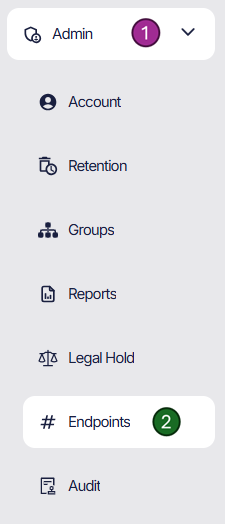
You can navigate to this screen by following the route on the left nav bar. 1 - Admin 2 - Endpoint
Endpoint
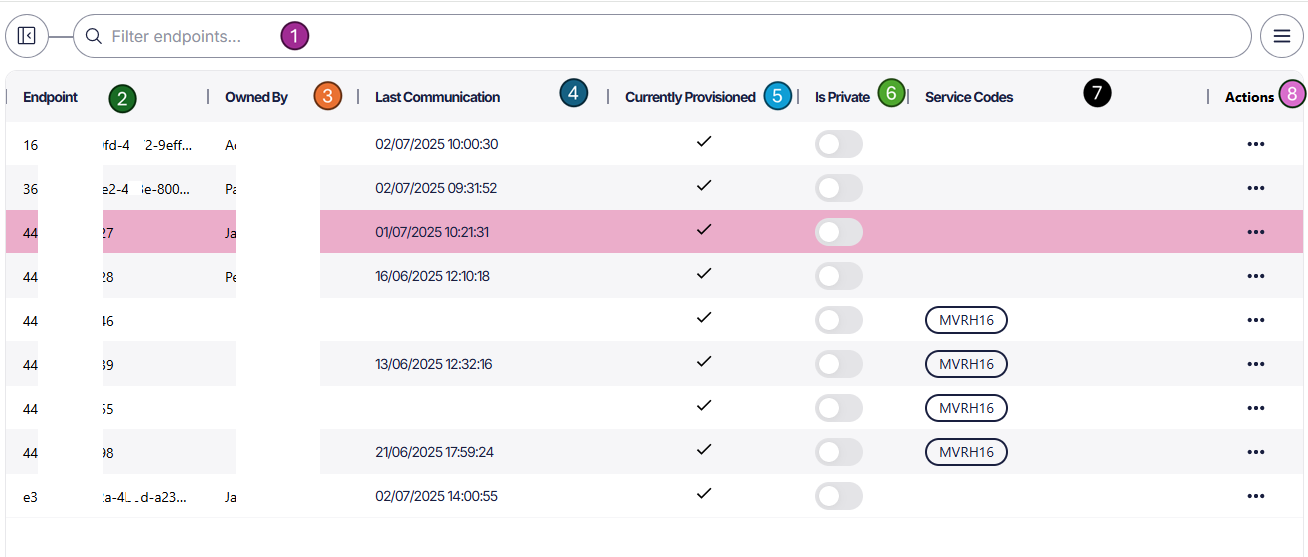
1 - Search for an endpoint, for accurate results, please enter the full number or id (partial numbers won’t work).
2 - Column for Endpoints provisioned, this could a be a Teams Guid or a phone number.
3 - If you have assigned an Endpoint to a Subscriber the mapping will be shown here. The mapping can be added within the Subscriber page or by (8) Actions.
4 - Shows the last time Focus had a communication for the endpoint.
5 - As people leave and join your organization, numbers will be provisioned and de provisioned. You can see the current endpoints state as of the last sync.
6 - Endpoints can be marked as private, this will add additional requirements to accessing the calls if not the endpoint owner.
7 - Here you can check the service code for the endpoint as per the contract. If wanting to check these on a larger scale, download the endpoints report and import the CSV into Excel.
8 - By clicking the 3 dots, the Owner of an endpoint can be assigned or unassigned. Endpoints will most likely be assigned during Subscriber creation.